
Profile & Account
Profile & Account
Your ScoreBird profile holds your personal information and a record of every organization you belong to. You can update most fields yourself at any time — your email address is the one exception, since it is tied to your account identity and login credentials. This section also covers password changes, signing out, and API key access.
Viewing Your Profile
Click your profile avatar (top-right corner of any screen) and select Profile, or navigate directly to /profile.
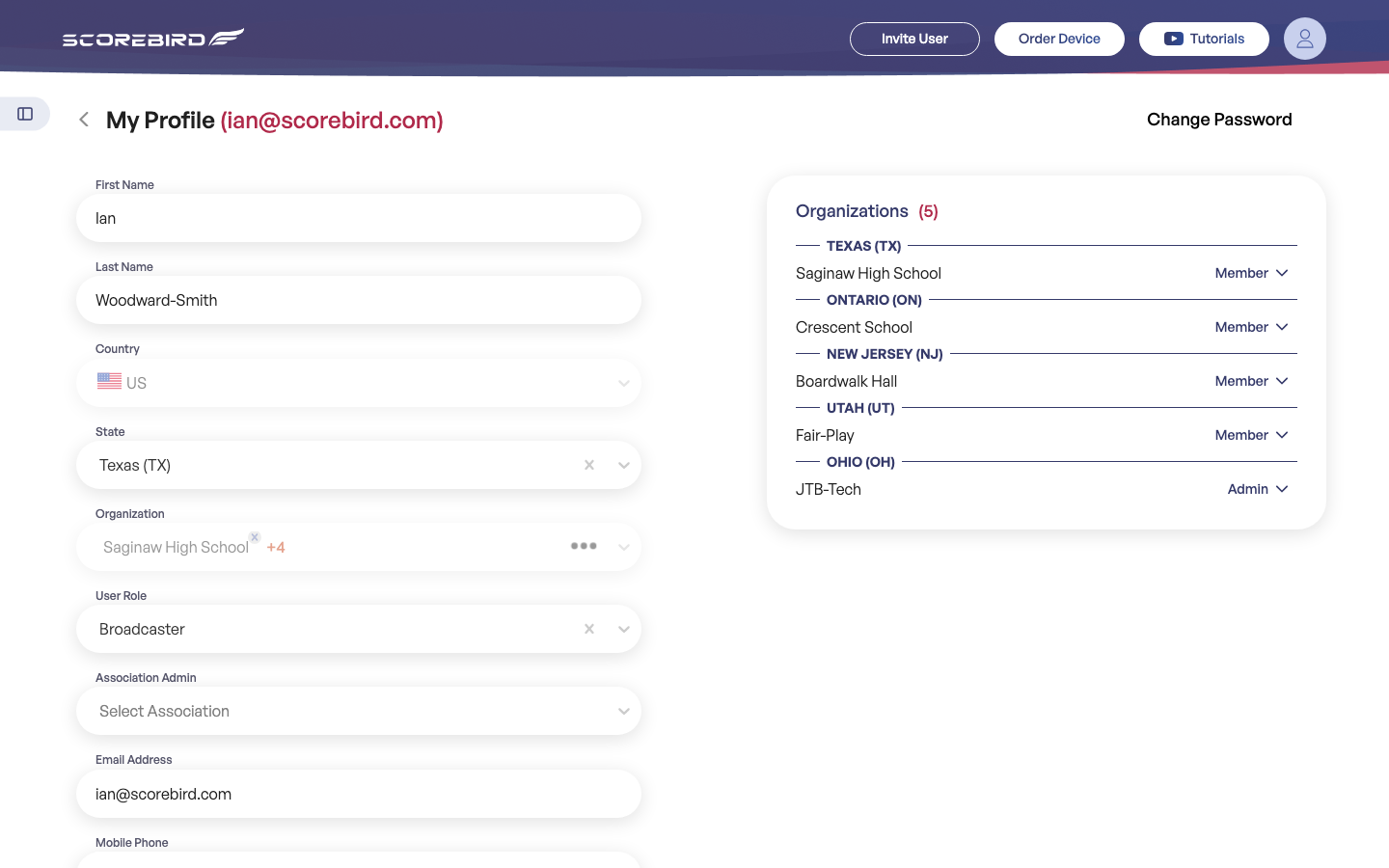
The profile screen is split into two panels:
- Left panel — your personal information and role settings.
- Right panel — a list of every organization you belong to, grouped by state or province, with your role at each.
Updating Your Information
- Navigate to Profile.
- Edit any of the fields in the left panel. All fields except Email Address are editable.
- Click Save Changes.
First Name — Your given name. Displayed in the Users list for your organizations. Editable.
Last Name — Your family name. Editable.
Country — Your country of residence. Select from the dropdown. Editable.
State — Your state or province. Populates based on the selected country. Editable.
Organization — The organizations you belong to. Shown as your primary org name plus a count of additional memberships (e.g. "Saginaw High School +4"). Read-only here — managed via the Users & Access flow.
User Role — Your primary role description: Broadcaster, Admin, Coach, or other. Used to describe your function across organizations. Editable.
Association Admin — If you administer a sports association, select it here. Used for association-level reporting and access. Editable.
Email Address — The email you use to sign in. Tied to your account identity. Read-only. Contact support@scorebird.com to change.
Mobile Phone — Your mobile number, used for account notifications. Include country code if outside the United States. Editable.
Your Organizations
The right panel of the Profile screen — labeled Organizations (N), where N is your total count — lists every organization you belong to. Entries are grouped by state or province.
Each entry shows:
- The organization's name.
- Your Role at that organization: Member or Admin.
This panel is read-only. To join an additional organization, see My Requests in the Users & Access section. To leave an organization, contact that organization's Admin or reach out to support@scorebird.com.
Changing Your Password
- Navigate to Profile.
- Click Change Password (link in the top-right area of the profile page).
- Enter your Current Password.
- Enter your New Password. Passwords must be at least 6 characters.
- Re-enter your new password in Confirm New Password.
- Click Save.
Note: You will remain signed in after changing your password. All other active sessions (for example, if you are signed in on another device) will be signed out and will need to sign in again with the new password.
If you have forgotten your current password, sign out and use the Forgot Password link on the sign-in page to reset it via email.
Signing Out
- Click your profile avatar (top-right corner of any screen).
- Select Sign Out.
You are returned to the ScoreBird sign-in page. Any unsaved changes on the current screen are discarded, so save your work before signing out.
API Key
Your ScoreBird API key gives third-party software and integrations authenticated read access to your organization's data — scores, schedules, device status, and more.
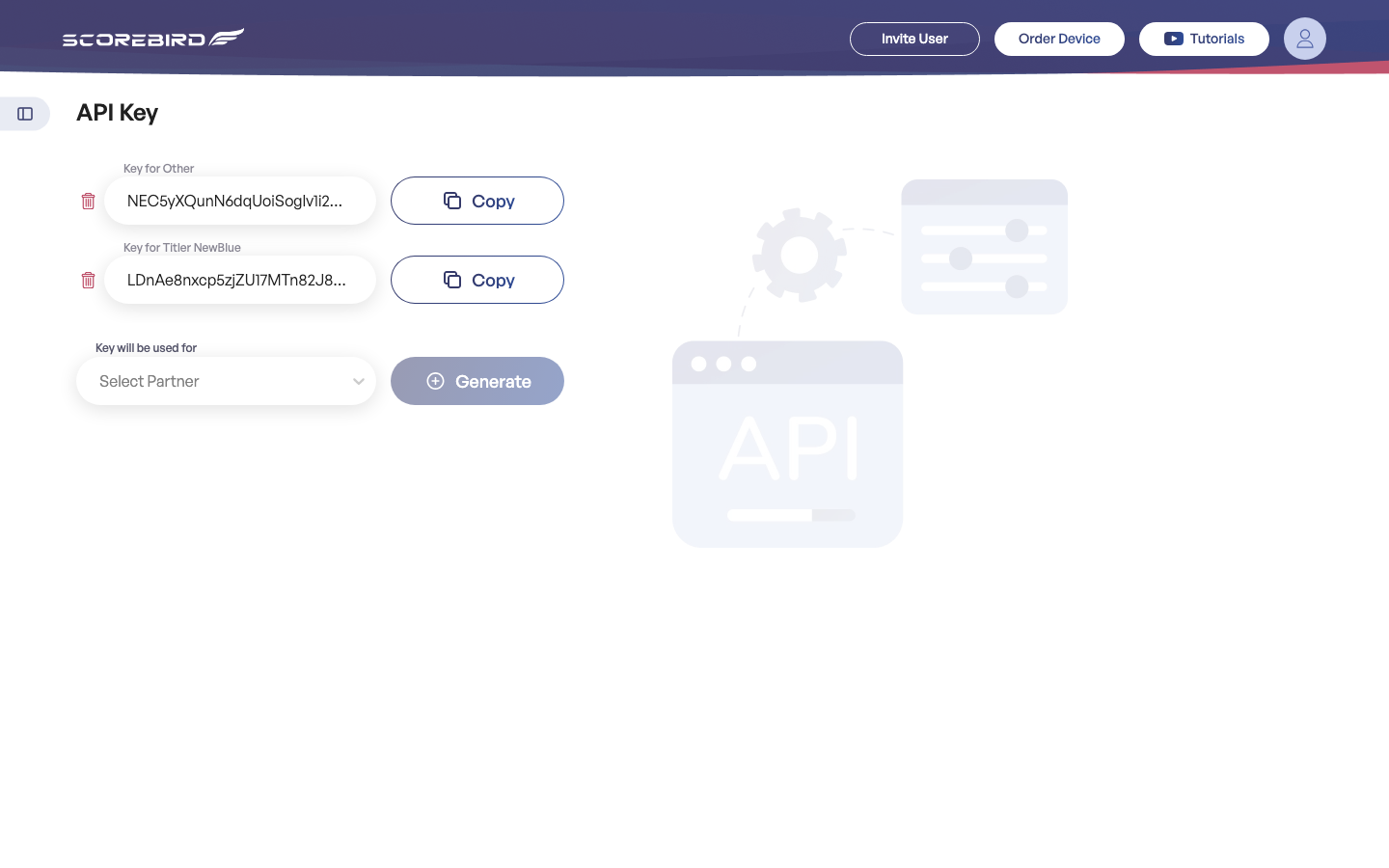
- Navigate to API Key in the left sidebar.
- Your API key is displayed on the page.
- Click the copy icon to copy it to your clipboard.
Note: Keep your API key private. Anyone who has it can read your organization's ScoreBird data. Do not paste it into public documents, commit it to source control, or share it in chat. If you believe your key has been compromised, contact support@scorebird.com to request a reset.
ScoreBird provides a full API for integrating scores, schedules, and other data with external systems — including websites, digital signage platforms, and custom applications. API documentation is available upon request. Contact support@scorebird.com to request access.
Still need help?
Can't find what you're looking for? Our support team is here to help.
Contact Support →Ready to automate your scores?
NeST connects to your scoreboard and powers everything you just read about.