
Multi-School Scoreboard Embed
Multi-School Scoreboard Embed
The multi-school scoreboard widget displays games from a group of schools on a single page. Visitors can filter by sport, level, school, and date range. During live games, the widget links directly to the virtual scoreboard for that game.
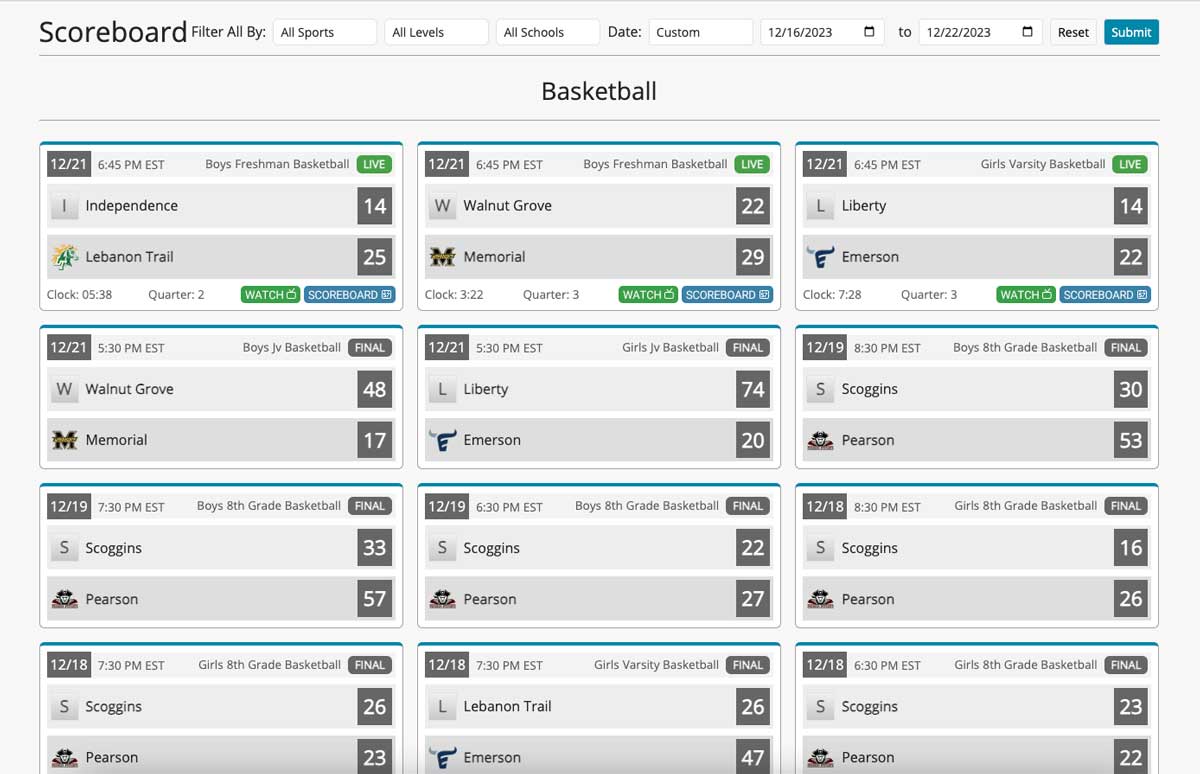
This widget is well-suited for conference portals, district websites, and any site that needs to surface scores from multiple schools at once.
For more information about virtual scoreboards, see the Virtual Scoreboards feature page.
Requirements
- A ScoreBird account
- A
tagvalue identifying your group of schools — obtain from the ScoreBird Portal
JavaScript Method (Preferred)
The JavaScript method is the recommended approach. It handles variable game counts and responds to container width better than a fixed-size iframe.
<div id="scorebird_scoreboard_widget"></div>
<script type="text/javascript">
  window.addEventListener('load', function () {
    ScorebirdScoreboard.init({
      selector: "scorebird_scoreboard_widget",
      tag: "",
      max_schedules: 50,
      partner: "",
      primary_color: ""
    });
  });
</script>
<script type="text/javascript" src="https://widget.scorebird.com/scorebird-scoreboard.min.js" async></script>
iFrame Method (Alternative)
Use the iframe method if you cannot add JavaScript to your page (e.g., some website builders).
<iframe
  style="border: 0px;"
  frameborder="0"
  width="100%"
  height="1000"
  src="https://widget.scorebird.com/scoreboard-widget.html?tag=&max_schedules=&partner=&primary_color=">
</iframe>
Parameters Reference
| Parameter | Required | Description |
|---|---|---|
selector | Yes | The id of the <div> element where the widget renders |
tag | Yes | ScoreBird identifier for the list of schools to display — obtain from the customer portal |
max_schedules | No | Maximum number of games to show (integer, default 50) |
partner | No | Partner identifier for co-branded deployments |
primary_color | No | Accent color for the widget UI (hex, e.g. #FF0000) |
tag is required. It tells the widget which schools to pull games from.
Troubleshooting
- No games showing? Verify your
tagvalue in the customer portal — it must match the school group identifier exactly. - Too many games listed? Lower the
max_schedulesvalue to limit how many appear. - Widget not fitting my page? Switch to the JavaScript method — it adapts to the container width and resizes as game count changes.
- Live game links not working? Confirm the linked schools have active NeST devices or ScoreBuddy Pro subscriptions.
- Need help? Contact support at support@scorebird.com or call 844-GOT-BIRD (844-468-2473).
Still need help?
Can't find what you're looking for? Our support team is here to help.
Contact Support →Ready to automate your scores?
NeST connects to your scoreboard and powers everything you just read about.